






powered by ParroPhins
ParroVenue
About Features How It Works Why ParroVenue Contact ๐Ÿš€ Schedule Demo
โœจ SMART VENUE & BOOKING MANAGEMENT

Smart Venue & Space
Management

ParroVenue helps halls, event venues, turfs, playgrounds and other bookable spaces manage venues, customer bookings, payments, invoices, certificates and reports โ€” all from one simple platform.

parrovenue.com
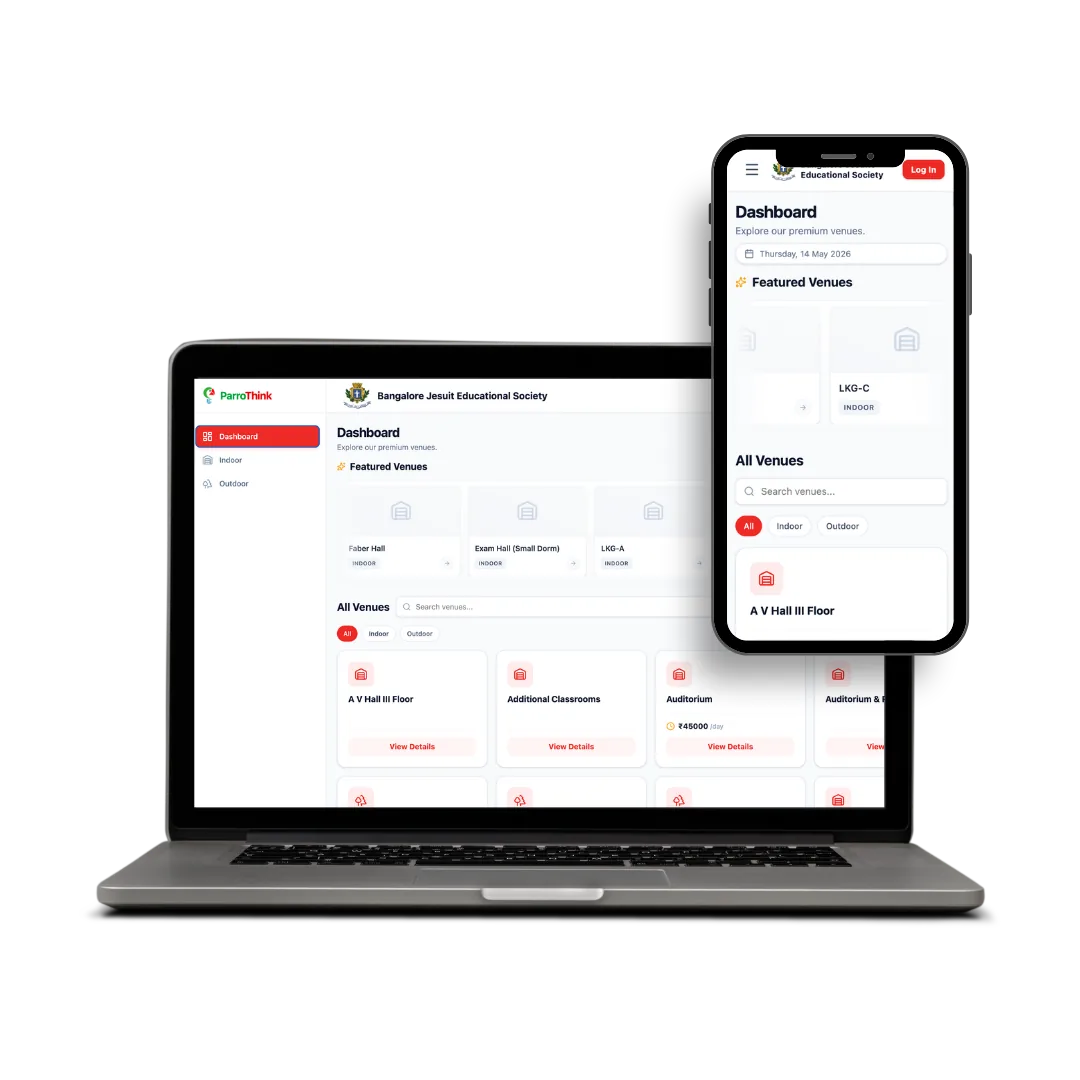
ParroVenue Admin Dashboard for PC
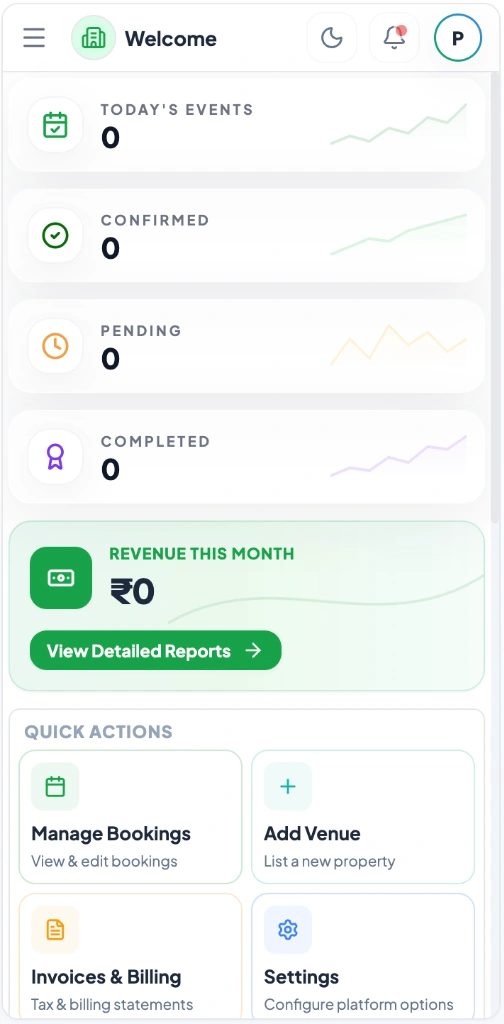
ParroVenue Mobile App Dashboard
๐Ÿ’ก Replace notebooks, spreadsheets & scattered records with one organized system.
๐Ÿข
Centralized System
1 Platform for All Spaces
๐Ÿ“–
Zero Registers
Digital Records
๐Ÿ“…
Organized Schedule
Visual Master Calendar
๐Ÿงพ
Instant Invoices
Receipts & Certificates
OFFICIALLY PARTNERED WITH
Airtel
AWS
Azure
Gupshup
Camsunit
Meta
Easebuzz
Airtel
AWS
Azure
Gupshup
Camsunit
Meta
Easebuzz

Still Handling Your Venue Operations & Bookings Manually?

Managing venue schedules, customer details, payment tracking, and paperwork manually can quickly lead to confusion as your bookings grow. ParroVenue replaces manual handwriting and scattered records with an all-in-one digital platform built to simplify your daily management.

๐Ÿ“–
01

Manual Booking Records

Bookings written in registers or notebooks make it difficult to search, update and track previous reservations.

๐Ÿ“ฒ
02

Scattered Customer Details

Customer information gets distributed across phone calls, messages, forms and different records.

๐Ÿ—“๏ธ
03

Booking Confusion

Checking dates and timings manually makes it difficult to quickly identify already-booked slots.

๐Ÿ’ธ
04

Payment Follow-Up

Tracking advance payments, pending balances and completed payments manually takes time.

๐Ÿ“
05

Manual Documents

Creating invoices, receipts, acknowledgements and certificates repeatedly becomes a manual task.

One Platform to Manage Your Complete Venue Booking Process

ParroVenue brings your venue information, booking calendar, customer details, payments, documents and reports together in one place. Whether you manage a single hall or multiple venues and facilities, your staff can organize the complete booking process digitally.

๐Ÿข

Manage Your Venues

Add and manage one or multiple halls, grounds, turfs or other bookable spaces with their details, facilities and location.

๐Ÿ“…

Manage Bookings

Create and manage bookings with date, time, venue and customer details while viewing your schedule through a centralized calendar.

๐Ÿ‘ค

Customer Management

Maintain customer information and collect the required details for each type of booking.

๐Ÿ’ฐ

Track Payments

Record payments received, monitor pending amounts and maintain payment history for every booking.

๐Ÿงพ

Generate Documents

Create invoices, receipts, payment acknowledgements and other booking-related documents directly from the system.

๐Ÿ“Š

Reports & Filters

Access booking, customer and payment reports with useful filters to quickly find the information you need.

Manage One Venue or Multiple Venues from One System

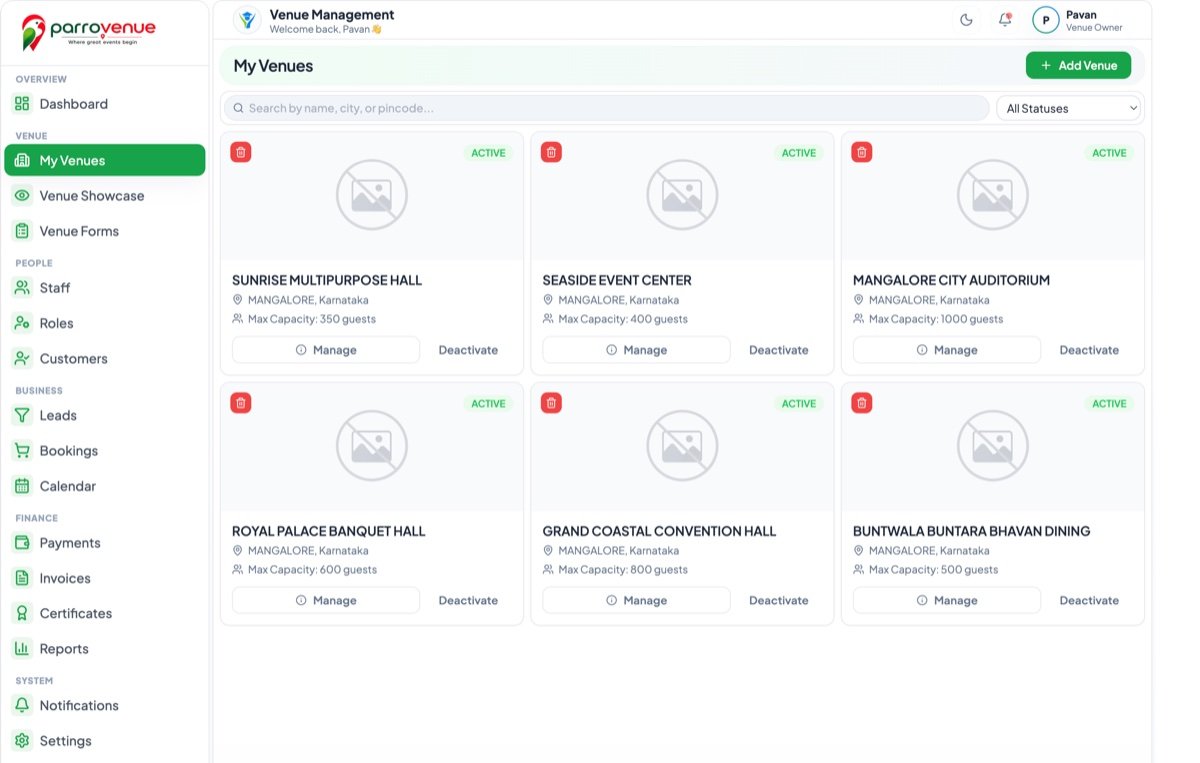
Add and organize all your bookable spaces in one place. Maintain venue information, categories, facilities, location and other details required by your staff.

๐Ÿข

Multiple Venues

Manage multiple halls, grounds, turfs or facilities from one platform.

๐Ÿ“

Venue Information

Maintain location, address, facilities and other important venue details.

๐Ÿท๏ธ

Categories

Organize venues and booking types according to your business requirements.

๐Ÿ“‹

Complete Venue Details

Keep important information about each space available to your staff.

ParroVenue Setup & Facilities Management Overview

See Your Entire Booking Schedule at a Glance

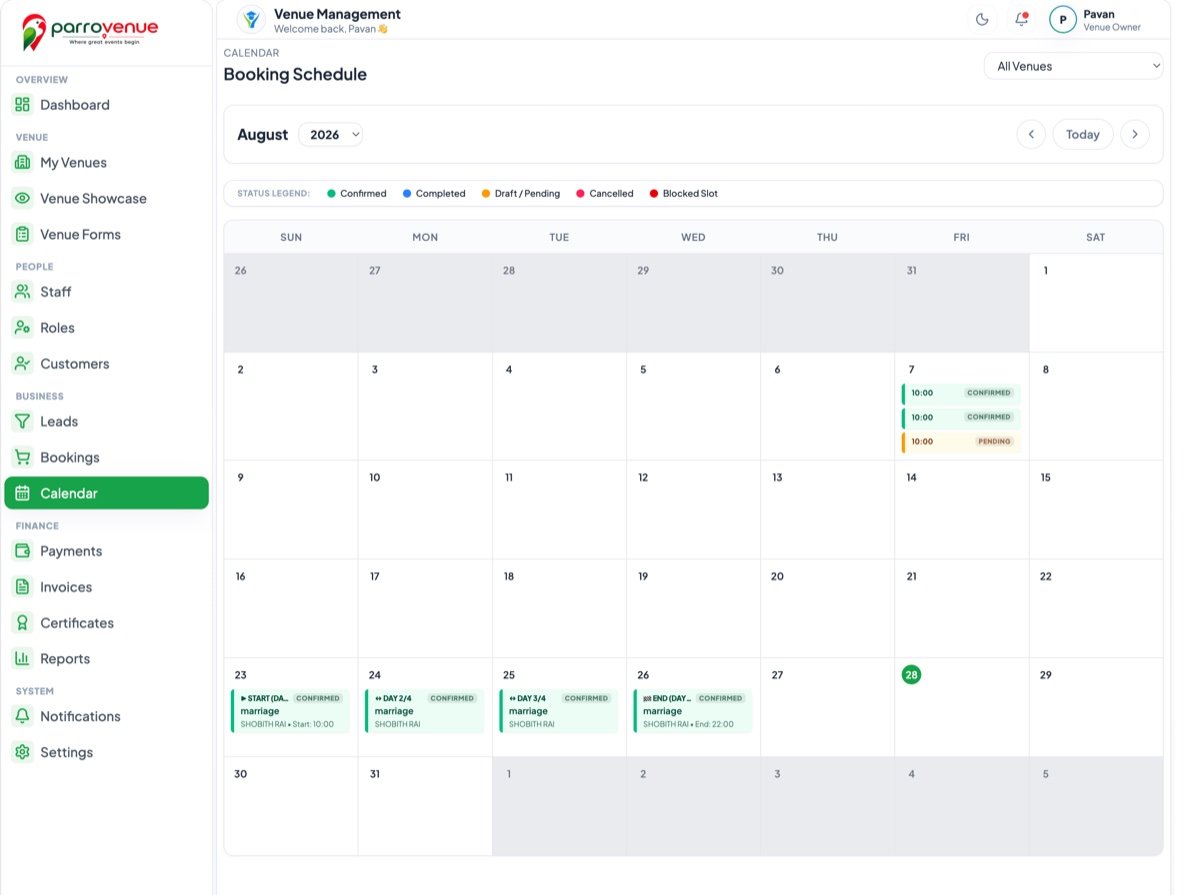
Stop searching through registers and old messages to find previous bookings. ParroVenue provides a centralized calendar view where staff can see bookings based on date and time and easily understand the venue schedule.

ParroVenue Master Booking Calendar Preview
๐Ÿ“†

Daily View

See bookings scheduled for a particular day.

๐Ÿ—“๏ธ

Weekly View

Understand venue schedules across the week.

๐Ÿ“…

Monthly View

Get a complete overview of upcoming bookings.

๐Ÿ”

Booking Details

Open a booking to view customer, venue, slot and payment info.

๐Ÿ’ก Overlap Prevention

When a venue is already booked for a particular date and time, staff can immediately see the existing booking while managing the schedule, helping reduce duplicate bookings.

Keep Every Booking and Customer Detail Together

Every booking becomes a structured digital record instead of another entry in a notebook.

๐Ÿ‘ค

Customer Details

  • โœ“ Name
  • โœ“ Contact information
  • โœ“ Booking information
  • โœ“ Event / Venue Requirements
๐Ÿ“…

Booking Details

  • โœ“ Assigned Venue / Space
  • โœ“ Booking Date
  • โœ“ Time & Duration Slot
  • โœ“ Booking Category & Type
  • โœ“ Booking Status
๐Ÿ’ฐ

Payment Details

  • โœ“ Total Booking Amount
  • โœ“ Advance Amount Received
  • โœ“ Remaining Pending Amount
  • โœ“ Complete Payment History

Create Booking Forms That Fit Your Business

Different venues need different information from customers. ParroVenue allows you to configure the information required for different booking categories and collect the right details during the booking process.

๐Ÿ›๏ธ Marriage / Function

Function Hall Form

  • Customer / family details
  • Function date & timings
  • Number of expected guests
  • Contact details
  • Special hall requirements
๐ŸŽ‚ Birthday / Party

Banquet & Party Form

  • Customer name
  • Event date
  • Event time & duration
  • Guest count
  • Party / setup requirements
โšฝ Turf / Playground

Turf & Sports Slot Form

  • Customer / player details
  • Booking date
  • Time slot selection
  • Play duration
  • Contact information

Know What Was Paid, What Is Pending and What Is Cleared

Keep payment information connected to each booking so your staff can quickly understand the financial status of every reservation.

๐Ÿ’ต

Advance Payments

Record payments received at the time of booking confirmation.

๐Ÿ“Œ

Pending Amounts

Clearly track the remaining balance for every booking before the event.

โœ…

Payment Status

Easily identify paid, partially paid and pending bookings at a glance.

๐Ÿงพ

Payment Acknowledgements

Generate payment acknowledgement documents for customers when required.

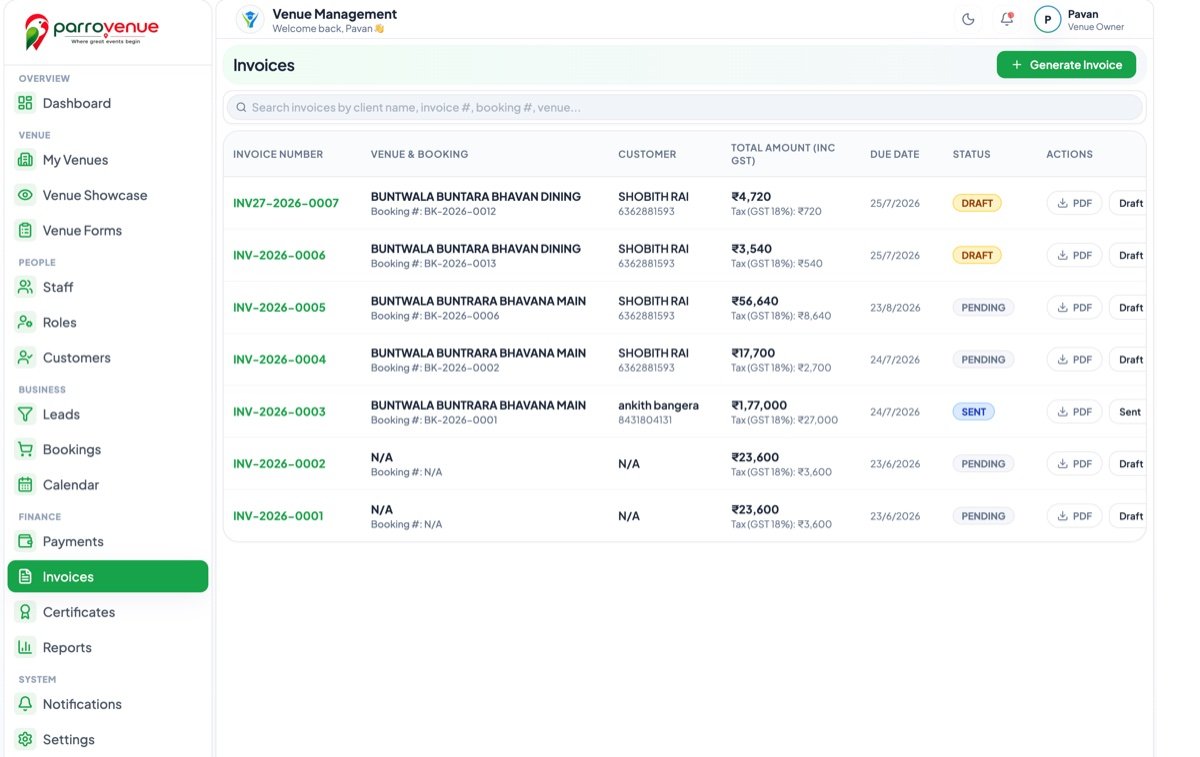
Generate Professional Documents Without Repeating Manual Work

Create booking-related documents directly from stored customer and booking information instead of preparing them manually every time.

๐Ÿ“„ Invoices
๐Ÿงพ Receipts
๐Ÿ“‘ Payment Acknowledgements
๐Ÿ“‹ Booking Documents
๐Ÿ“œ Certificates
๐Ÿ–จ๏ธ Print-Ready Documents
ParroVenue Invoicing & Automated Document Generator Preview

Create and Print Certificates from Your Venue Software

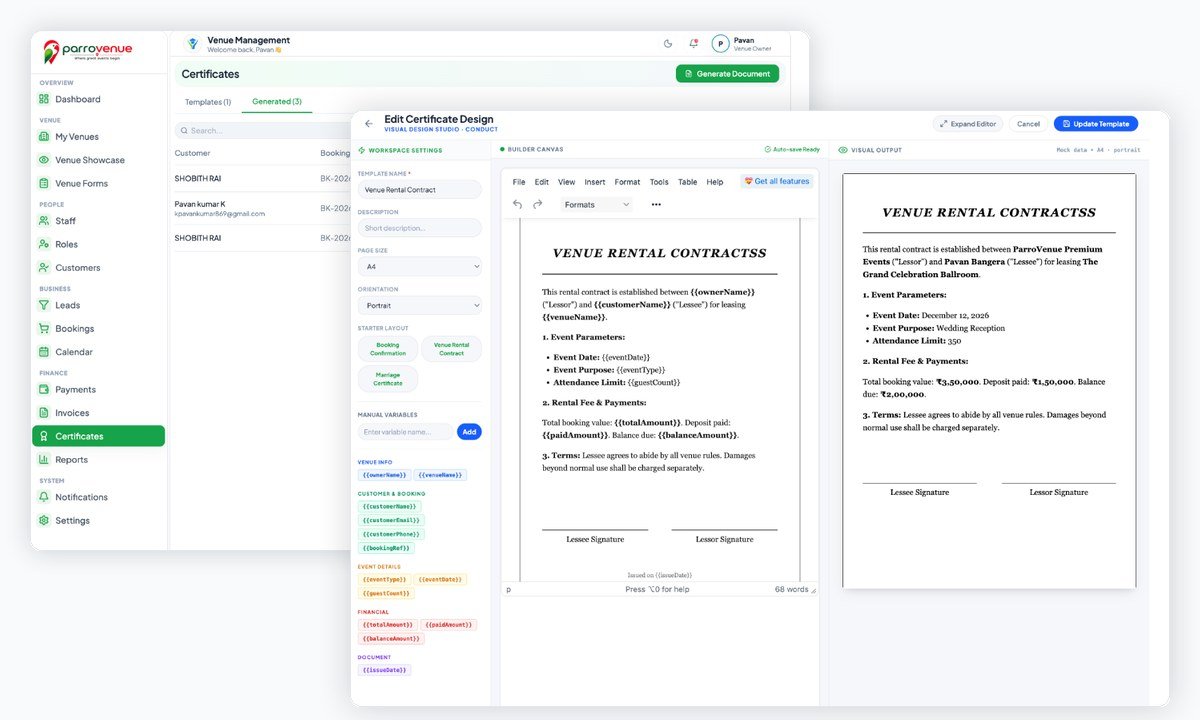
Create certificate templates according to your requirements and generate them using customer and booking information already stored in ParroVenue.

๐Ÿ“œ
Customized Certificates:

Customized marriage/event certificates and other print-ready certificates can be generated directly from the system whenever required.

(ParroVenue provides venue-customized certificate templates for internal records and event confirmation.)
ParroVenue Custom Certificates & Visual Design Studio Preview

Find the Information You Need in Seconds

Get organized reports across bookings, customers and payments with filters that help your staff quickly find the required information.

๐Ÿ“…

Booking Reports

Filter bookings by date, venue, category and booking status.

๐Ÿ’ฐ

Payment Reports

Track collected, pending and completed payments easily.

๐Ÿ‘ฅ

Customer Reports

Search and review customer booking history and information.

๐Ÿข

Venue Reports

Understand booking activity and utilization across different venues.

๐Ÿ”Ž

Smart Filters

Quickly find records without manually searching through paper registers.

From One Hall to Multiple Facilities

ParroVenue can be used by businesses and organizations managing different types of bookable spaces.

๐Ÿ›๏ธ

Marriage & Function Halls

Manage marriage functions, receptions, parties and other events.

๐ŸŽค

Event & Convention Venues

Manage event spaces and scheduled bookings effortlessly.

๐Ÿข

Banquet & Party Halls

Organize customer bookings, payments and documents in one place.

โšฝ

Turfs & Playgrounds

Manage date and time-based facility bookings with ease.

๐ŸŸ๏ธ

Sports Facilities

Keep track of facility schedules and customer bookings.

๐ŸŽช

Other Bookable Spaces

Manage any venue or facility where customers reserve a specific date or time.

From Venue Setup to Completed Booking

Follow simple digital steps to modernize your venue booking process.

01 Step 01

Add Your Venue

Add your hall, turf, playground or facility with its details, capacity and location.

02 Step 02

Configure Your Booking

Set up booking categories and collect the required details for different reservation types.

03 Step 03

Create the Booking

Enter customer details, select venue, date and time, and confirm the booking slot.

04 Step 04

Track the Schedule

View bookings through the master calendar and keep track of upcoming reservations.

05 Step 05

Track Payments

Record received payments, manage advances, and monitor remaining balance.

06 Step 06

Generate Documents

Create invoices, receipts, acknowledgements and certificates whenever required.

07 Step 07

View Reports

Use filters and reports to understand bookings, customers and revenue across your business.

Manual Venue Management vs. ParroVenue

See how digital venue management simplifies everyday operations for your staff.

Area Traditional Method ParroVenue Smart Platform
Venue Details โŒ Registers & scattered records โœ“ Centralized venue information
Booking โŒ Notebook / WhatsApp / phone calls โœ“ Digital booking records
Availability โŒ Check manually through registers โœ“ Calendar-based schedule view
Customer Details โŒ Separate paper notes & messages โœ“ Stored digitally with booking
Payments โŒ Manual calculations & notes โœ“ Payment & balance tracking
Receipts โŒ Manually prepared every time โœ“ Generate instantly from system
Certificates โŒ Prepare separately on paper โœ“ Generate from customized templates
Reports โŒ Manual searching through old logs โœ“ Filterable digital reports
Multiple Venues โŒ Separate physical registers for each โœ“ Manage all venues from one system

Everything Your Venue Team Needs. In One Place.

๐Ÿข

Venues

Manage your spaces, halls, turfs and facilities.

๐Ÿ“…

Bookings

Manage date and time-based customer reservations.

๐Ÿ‘ฅ

Customers

Keep customer details and contact records organized.

๐Ÿ’ฐ

Payments

Track paid, pending and completed transaction amounts.

๐Ÿงพ

Documents

Generate invoices, payment receipts and acknowledgements.

๐Ÿ“œ

Certificates

Create customized certificates and print-ready forms.

๐Ÿ“Š

Reports

Search and filter your business and revenue analytics.

GET STARTED

Ready to Move Beyond Booking Registers?

See how ParroVenue can simplify your venue bookings, customer management, payments, documents and reports.

๐Ÿš€ Request a Live Demo

Schedule a Live Product Demo

See how ParroVenue can help you manage your venues, bookings, customers, payments and documents from one centralized system.

๐Ÿ“ž
Phone & Sales

+91 88844 33077 / +91 99000 11223

๐Ÿ“
Corporate HQ

ParroPhins Private Limited, Mangalore, Karnataka - 575001

โœ‰๏ธ
Email Inquiry

sales@parrophins.com / support@parrophins.com